
In addition to flight calculations,
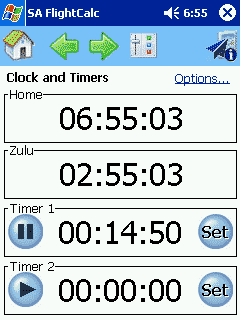
FlightCalc can also be used as a very versatile in-flight timer. It shows both your local (Home) time and the associated Zulu time. Among other things, this makes it simple to do the mental conversion when you hear an ATIS in Zulu.
Below the clocks are two timers. Each one can be configured to count up (the default) or count down from a specific value. To start or stop the timer, just click anywhere on the display (yes, you can tap the
blue Play and Pause buttons, too). The blue Set button resets the timer or establishes a new count-down value.
If you'd like to simplify the display, just click Options at the upper right and tell
FlightCalc and hide whatever you don't need.
The count-down timers can be told to beep and/or flash when they reach zero.
|
 |
