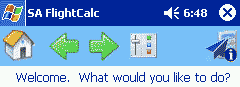
The main screen is where it all begins. From here, just click the sort of function you'd like (Perform a flight-related calculation, etc.) You'll also notice the
Home button, navigational arrows and the Options button. It's hard to tell from the screen shot but these buttons are large enough for finger use so you can leave your stylus at home.
From anywhere in FlightCalc, click the Home button to go back to this screen.
Again from anywhere, use the Back and Forward buttons to move back and forth between screens, just like a Web browser. This means no complicated menu structure to remember!
The Options button (the icon next to the green Next arrow) lets you set
the type of units you prefer - Fahrenheit or Celsius, MPH or Knots, etc. Tap that button to see the display switch to whatever units you prefer.
|
|